Got your #DLXXIII ticket through Ticketmaster? Here’s how to get it ready in the Download Festival app powered by Vodafone so you can hit the gates stress-free.
Step 1: Claim your ticket in your Ticketmaster account.
Log into your Ticketmaster account to officially claim your ticket. If you skip this step, your ticket won’t show up in the app.
Step 2: Download the official festival app
Get the app from the App Store (iOS) or Google Play (Android).
Step 3: Log into your Ticketmaster account via the app
Head to the ‘My Tickets’ section and follow the prompts to log into your account. Once you’ve claimed your ticket and logged in, your ticket will appear under the ‘My Tickets’ tab.
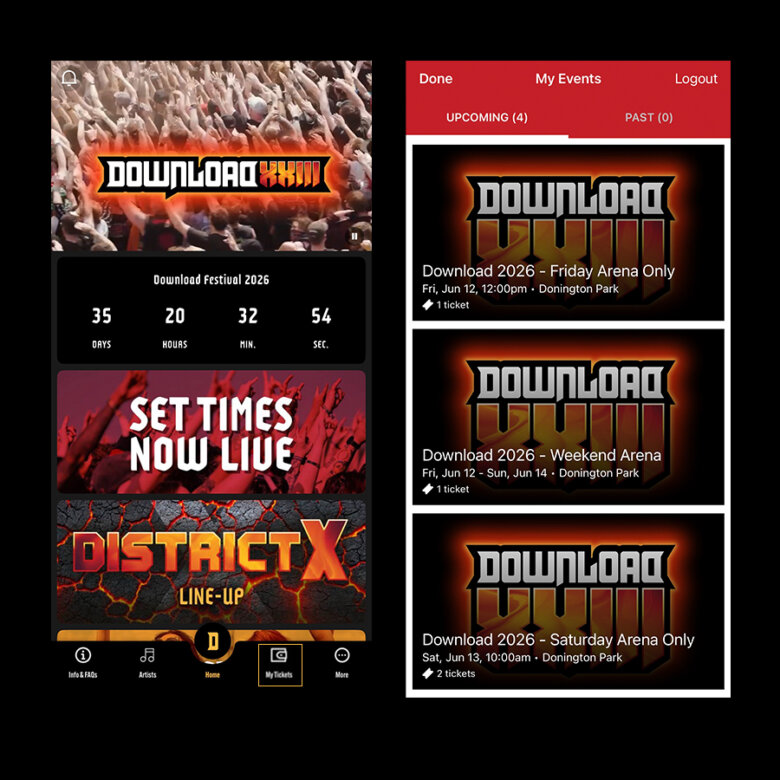
Please note, this only applies to tickets purchased through Ticketmaster. If you bought your ticket from another provider, further information can be found below:
AXS – Your tickets will be available in the lead booker’s account within the AXS mobile app. Open the app and navigate to the ‘Tickets’ tab, then select Download 2026 to view your tickets. Please ensure this is completed before arriving at the event. Alternatively, you can download the PDF tickets to your mobile and use them for entry. No need to print – just present them on your device upon arrival. Please make sure your tickets are downloaded and accessible before attending the event. If you have not received an email from noreply@boxoffice.axs.com confirming your ticket(s) at least 3 days before the event, please get in touch via the Contact Us page on the AXS website.
Big Green Coach – If you have booked your ticket directly with Big Green Coach, your festival ticket and return coach travel will be issued together as a single e-ticket. This will be sent to you by email around a week before you are due to travel. The same e-ticket will be used for both festival entry and coach boarding. Please keep an eye on your inbox, including your spam and junk folders, at this time. If you have any issues with your booking, please contact customerservice@biggreencoach.co.uk.
Eventim – Once tickets are ready, they’ll be available to download in your Eventim UK account after selecting the order. Please allow up to 48 hours before the event for tickets to appear in your account.
Gigantic – E-tickets will be available to download from Wednesday 3rd June at 3pm. This means you can now access your tickets directly from your mobile, offering a more convenient and eco-friendly solution by eliminating the need for paper tickets. To download your e-tickets, simply follow the link that will be sent to you via email by Gigantic once the tickets are released.
SEE – To make sure you are all set, download the See Tickets Wallet mobile app. The ticket has an animated image and can only be shown from within the app, so screenshots won’t work. Next, you’ll need to import your tickets into your See Tickets account. Tickets may not be ready straight away and can appear anytime up to one week prior to the event date. Please allow until this time before contacting SEE if your tickets are not ready yet.
Our tips
- For quick and easy entry, please ensure you transfer tickets to the rest of your party before you arrive. To do this, tap the ‘Transfer Tickets’ button, enter your recipient’s information (including their email address which they’ll need to register for a Ticketmaster account) and hit ‘Transfer Ticket’.
- We recommend saving your tickets to your own e-wallet (Apple Wallet, Google Pay etc) before arriving at the festival as screenshots will not be accepted.
- Can’t see your tickets? Make sure you’re using the latest version of the app and that the email address you’re using to sign in is the same one you used to purchase your tickets.