How to use this guide:
- Please select your ticket type and find your colour-coded route on the local area map below – designated by the direction that you are coming from
- Use the table to take you to the starting point of your colour coded route and use these details to direct your sat-nav / Google Maps
- Once you get to your colour coded route start point, follow the roadside event signage based on your ticket type
- It is important that you follow the festival signage at this point and don’t attempt to use alternative routes to keep traffic moving
General, eco, camping plus & ready to rock
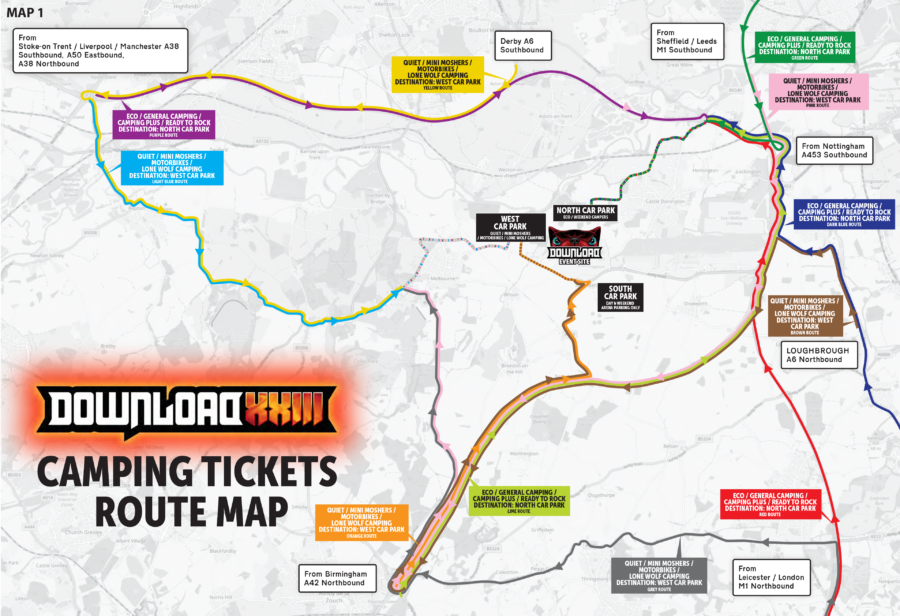
| Travelling from... | Route colour | Map routes |
|---|---|---|
| The North West via Stoke-on-Trent / Liverpool / Manchester (A38 Southbound / A50 Eastbound / A38 Northbound) | Purple | Google Maps / Apple Maps |
| The North via Derby (A6 Southbound) | Purple | Google Maps / Apple Maps |
| The North via Sheffield / Leeds (M1 Southbound / A1 Southbound) | Green | Google Maps / Apple Maps |
| The North East via Nottingham (A453 Southbound) | Red | Google Maps / Apple Maps |
| The South East via Loughbrough (A6 Northbound) | Dark blue | Google Maps/ Apple Maps |
| The South via Leicester / London (M1 Northbound) | Red | Google Maps/ Apple Maps |
| The South West & Midlands via Birmingham (A42 Northbound) | Lime | Google Maps / Apple Maps |
Quiet, mini moshers, motorbike & lone wolf camping
| Travelling from... | Route colour | Map routes |
|---|---|---|
| The North West via Stoke-on-Trent / Liverpool / Manchester (A38 Southbound / A50 Eastbound / A38 Northbound) | Light blue | Google Maps / Apple Maps |
| The North via Derby (A6 Southbound) | Yellow | Google Maps / Apple Maps |
| The North via Sheffield / Leeds (M1 Southbound / A1 Southbound) | Pink | Google Maps / Apple Maps |
| The North East via Nottingham (A453 Southbound) | Pink | Google Maps / Apple Maps |
| The South East via Loughbrough (A6 Northbound) | Brown | Google Maps / Apple Maps |
| The South via Leicester / London (M1 Northbound) | Grey | Google Maps / Apple Maps |
| The South West & Midlands via Birmingham (A42 Northbound) | Orange | Google Maps / Apple Maps |
Where can I park?
Check out the below table to see the best car park for you.
Customers who have applied for accessible parking will find their allocated car park indicated on their parking hanger. Please refer to the Accessibility Guide for all relevant information.
| Ticket type | Car park |
|---|---|
| General, Eco, Camping Plus & Ready to Rock | North Car Park |
| Quiet, Mini Moshers, Lone Wolf Camping, Motorbike Parking | West Car Park |
Arriving by car
Once you arrive in the car parks, please follow the directions from the parking stewards to ensure everyone can be safely parked and the car park is fully utilised. Please ensure your car park pass is visible in the windshield of your vehicle.
Arriving by motorbike
If you are parking in the Motorbike parking, your ticket will be scanned on entry and will be issued with a wristband that you can attach to your vehicle.
Accessible parking
If you have applied for accessibility camping or accessibility day ticket car parking, please refer to the accessibility guide for relevant information. Please note that accessible parking bays will be available in both the West and North car parks, located within close proximity to the West or East Entrance. Spaces are allocated through the Accessibility Application process. For more information on how to apply, please visit our accessibility page.
Got a question?
If you have any queries on the above, please do not hesitate to contact our team.